How to Check Your Watch's Accuracy: Three Ways, and the Habit That Makes Them Work
Compare your watch with atomic time twice, a day apart, without setting it. Here's how, plus the photo and timegrapher methods and what each number means.
The short answer
Compare your watch with a trusted time reference, note how far ahead or behind it is, and do the same thing again 24 hours later without setting or stopping the watch in between. The change in that offset, divided by the days between the two checks, is your watch's rate in seconds per day (s/d). A watch that was 2 seconds ahead yesterday and 7 seconds ahead today is running at +5 s/d.
That's the whole method. Everything else, from apps to timing machines, is a way of making those two readings more exact, or of getting a number faster.
What "accuracy" actually means
Watchmakers talk about rate, not accuracy. The rate is how many seconds a watch gains (a plus sign) or loses (a minus sign) over a day. It changes with how the watch is worn, how it rests at night, how fully wound it is and the temperature, so one reading is a snapshot, not a verdict.
Two things matter, and they're different:
- How far the rate is from zero. That's what most people mean by accuracy. It's what certificates such as COSC's −4/+6 s/d measure (more on the numbers in how many seconds a day is normal).
- How steady the rate is from day to day. A watch that gains a steady 8 seconds a day is easy to live with, and a watchmaker can regulate it. One that gains 2 seconds one day and 15 the next is telling you something is wrong.
So the goal of checking isn't one number. It's a few readings that show both.
Method 1: the 24-hour offset check
You need a reliable reference and a notebook (or an app that keeps the notebook for you).
- Pick a reference. Use atomic time from a network time server, such as time.gov from the US National Institute of Standards and Technology. Your phone's clock is usually close, but you can't see how close, and a few tenths of a second matter when you compare a day apart.
- Wait for the seconds hand to cross 12. At that instant, note the reference time to the second. Write down the offset: watch time minus reference time. If the reference says 10:15:58 when your watch hits 10:16:00, the watch is +2 s.
- Don't touch it. Wear the watch as you normally would. Don't set it, don't let it stop, and if it's a manual wind, wind it at your usual time.
- Repeat 24 hours later. Same procedure, same reference. Subtract the first offset from the second and divide by the days in between.
- Keep going for a week. Three readings are the minimum to see whether the rate is steady; seven tell you how it behaves on desk days, active days and weekends.
Here's what a week looks like:
| Day | Offset | Rate since the day before |
|---|---|---|
| Mon | +2 s | — |
| Tue | +7 s | +5 s/d |
| Wed | +11 s | +4 s/d |
| Thu | +17 s | +6 s/d |
| Fri | +21 s | +4 s/d |
Average: about +5 s/d, and steady. That watch is fine.
How exact is a tap?
Your reaction time is the weak point. If each reading is good to roughly three tenths of a second, the error over a 24-hour gap is well under half a second per day, and it shrinks the longer you wait between readings. That's why a day apart beats an hour apart: over one hour, the same error would swamp the rate entirely.
Method 2: photograph the dial
A photo freezes the moment, which takes your reaction time out of it. Hold your phone so the watch dial and an atomic-time clock on a second screen are both in the frame, or use an app that records the photo's exact capture time against a time server. Read the seconds hand off the photo afterward, at your leisure. Make sure the seconds hand is sharp; a blurred hand is a guess.
Repeat a day later, and the arithmetic is the same as Method 1.
Method 3: a timegrapher
A timegrapher (a watch timing machine) listens to the tick of the movement and, within seconds, works out the rate the watch would keep if it held that exact position and state of wind for a whole day. It also shows two things you can't get by comparing with a clock:
- Beat error, in milliseconds: whether the tick and the tock are evenly spaced.
- Amplitude, in degrees: how far the balance wheel swings, one of the best clues to the movement's condition.
Watchmakers use machines with a contact sensor that clamps the watch and tests it in several positions. Phone apps use the iPhone's microphone instead. They're useful for spotting trends and big problems, but treat their numbers as estimates: background noise, how firmly you hold the watch to the phone, and the lift angle setting all move the result.
One subtlety trips people up. A timegrapher's rate is instantaneous: this position, this much wind, right now. Your 24-hour check is the average of everything your watch went through, wrist and nightstand included. They often disagree by a few seconds, and both are right. The daily average is what you live with; the timegrapher helps explain it.
Which method should you use?
| Method | What you get | Time needed | Best for |
|---|---|---|---|
| 24-hour offset (tap) | Real-life daily rate | A day per reading, a week for a picture | Everyone, every watch, quartz included |
| Dial photo | Same, without reaction-time error | A day per reading | Small dials, sub-seconds, shaky hands |
| Timegrapher | Instant rate per position, beat error, amplitude | 30 seconds to a few minutes | Diagnosing a change, comparing positions |
If you only do one thing, do the 24-hour check for a week. If a number surprises you, a timegrapher reading is the next step.
Habits that make the numbers trustworthy
- Same time each day. It keeps the gaps even and catches the same part of your routine.
- Note the night position. Dial up, crown down and so on can shift the rate by several seconds; why your watch runs fast or slow explains why.
- Start fully wound. For an automatic you haven't worn for a while, wind it by the crown as its manual describes, so you're not measuring a run-down mainspring.
- Watch for jumps. A watch that was steady at +4 s/d and is suddenly at +30 s/d probably met a magnet, not a sudden fault. See is my watch magnetized.
- Don't chase decimals. A difference of one second a day between two readings is noise, not news.
In Escapement
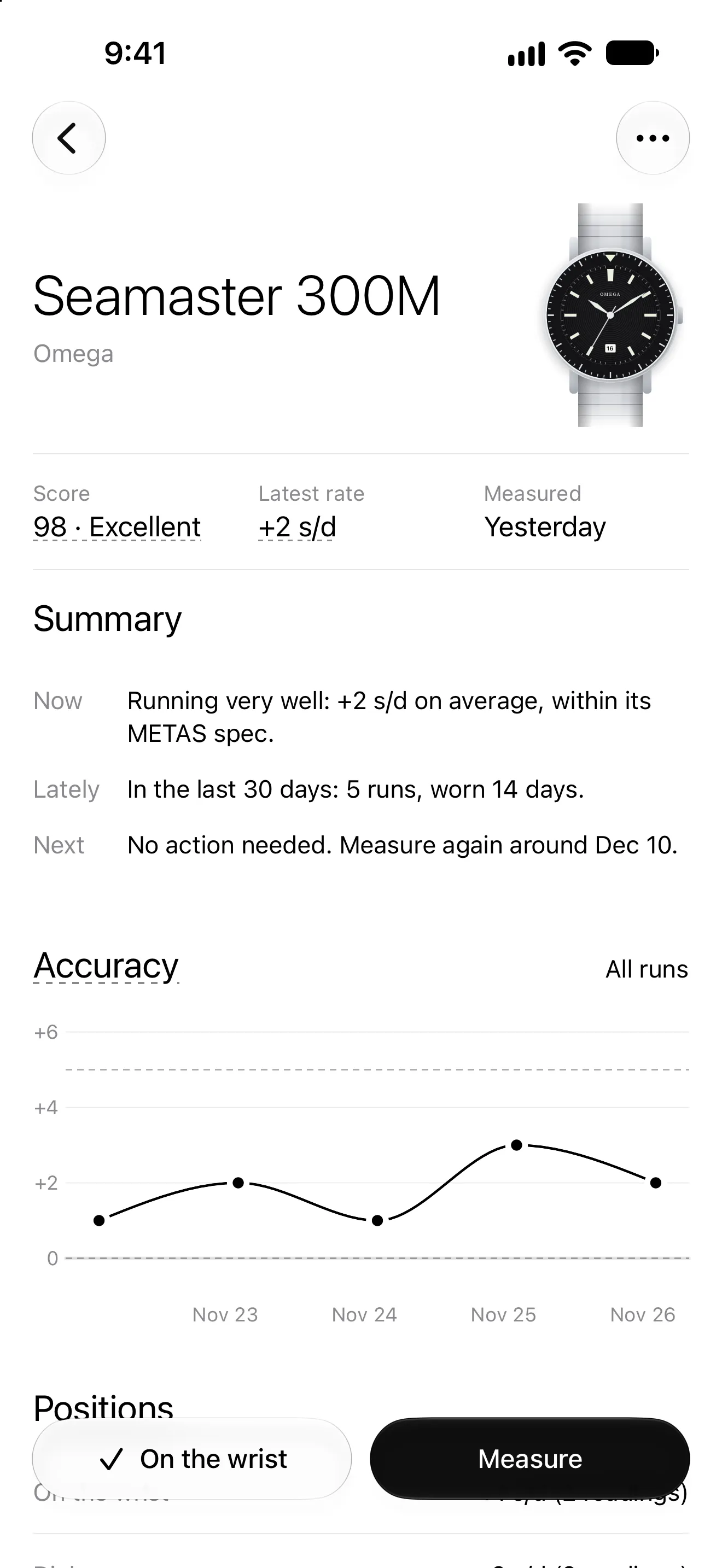
Escapement keeps the notebook for you and does the arithmetic. Measure → Start measuring offers Tap, Photo and Audio, plus Enter rate manually for a reading from your watchmaker's machine.
- Tap shows a reference clock in Atomic time, set from a network time server, and times your tap the moment your finger lands. The next tap, a day later, gives the rate. Points must be at least six hours apart; readings under twelve hours are marked preliminary.
- Photo records when you took the picture, corrected to atomic time, and you set the time shown on the dial afterward.
- Audio listens for 30 seconds through the microphone and shows the rate, beat error, approximate amplitude and beats per hour, with a confidence grade.
You can tag each reading with its position and conditions, and the watch's Health score is built from its latest seven readings: how far the average rate is from zero (or from the middle of its accuracy spec), how steady it is, and how long since its last service. It ends in one next step, such as measuring again this week.
FAQ
Can I just use my phone's clock?
For a rough check, yes. Phones sync their clocks over the network and are usually close. For day-to-day rate measurements, a reference you know is atomic time removes a source of error you can't see.
How long should I measure my watch?
At least three readings a day apart, ideally a week. One reading tells you the rate for that day; a week tells you whether it's steady, which matters more.
Why does my timegrapher reading differ from my daily rate?
A timegrapher measures one position at one moment. Your daily rate averages every position, temperature and state of wind the watch went through. A difference of a few seconds is normal.
Does this work for a quartz watch?
The offset method works for any watch. Quartz watches drift so little that you'll want a week or more between readings, and their accuracy is usually quoted per month rather than per day.